What I Built in One Week with Claude
"Wait, how did you do that?" I asked my wife.
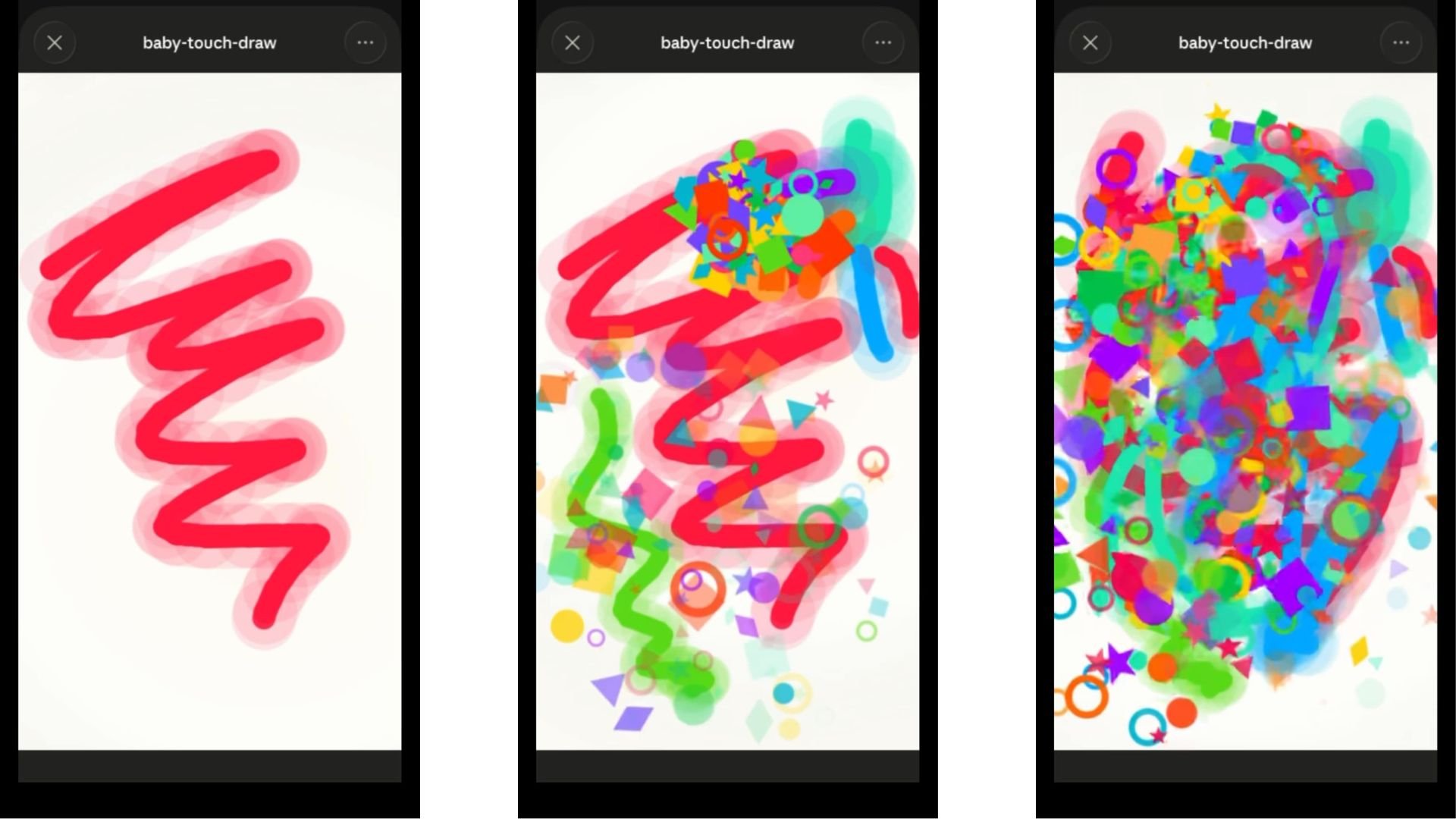
In her hand was her iPhone with a blank white canvas on the screen. When she tapped it, stars, squares, and moons jumped off the screen in colorful patterns. Then, she shook her phone to erase the patterns and instead used her fingers to make a bright orange and red tic-tac-toe board. We were in store for a 2-hour car ride with our baby, who already finds our light boxes fascinating. The idea was to create for her some kind of painting app.
As I picked up her phone, it went horizontal and messed everything up. She went back in Claude, made an adjustment, and now the app was firmly locked in place. The only way for our daughter to unlock the screen was with a combination of the side buttons. It ended up looking like this:
While I've had many conversations with friends and colleagues about Claude, I didn't grasp what made this LLM different compared to Gemini and ChatGPT. These two already do everything I want, so why should I spend another 20 bucks a month on yet another tool. But Claude is different. It's not just for cleaning up grammatical issues or rethinking workflows. It can build and design an actual product.
This would've been the moment in a cartoon where you saw a lightbulb go off over my head. And it got me thinking...
Could I now create additional resources for my students?
Could I improve the search functions within a course?
What if I wanted to make some kind of learning app?
Can I actually own whatever I create and upload it into an LMS?
A thousand ideas hit me at once imagining I had an AI sidekick that could bring my ideas to life.
It's only been one week of using Claude, but after several experiments. You need to try this. Here's what I've been able to do:
1. Simulations
I'm no stranger to simulations. I've used many in my courses and I love creating Custom GPTs to mimic the scenarios in simulations. Some of my past designs include the ID Interview Coach and the Unresponsive SME. And while these are fine, they lack refinement and visuals. There are only so many things I can do with OpenAI's interface. The other issue I've encountered is that to use these simulations, you need to be able to access OpenAI's website. This has created issues for users not being able to get past security settings or using an older model that caused complications. I became a pseudo OpenAI IT person to help out some of my students.
The concept was there, but it lacked execution. So, here was my idea: can I take the SME simulation and kick it up a notch with Claude? The answer was absolutely.
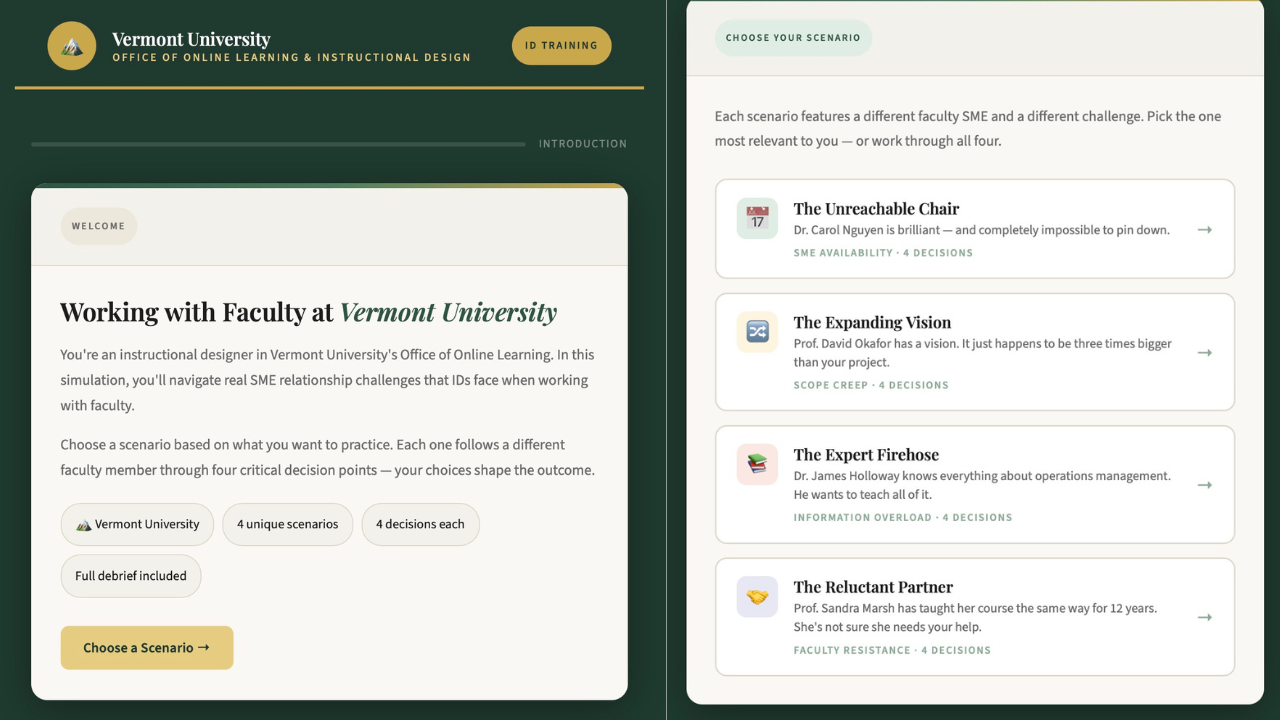
What you are seeing is a scenario of an instructional designer working for Vermont University's Online Learning Department. The instructional designer can choose to work through 4 challenging scenarios:
A SME's Availability
Scope Creep
Information Overload
Faculty Resistance
All of these are ones instructional designers have faced in their day to day. In each of these scenarios, the user is introduced to a main character, like a faculty member, and then provided context on why there is a problem. The user has to decide how they want to respond to each prompt. Depending upon this action will then change the outcome of the situation. Each one can lead to positive or negative outcomes followed by a debrief and tips for the next move. At the end of the simulation, there is a breakdown with key takeaways:
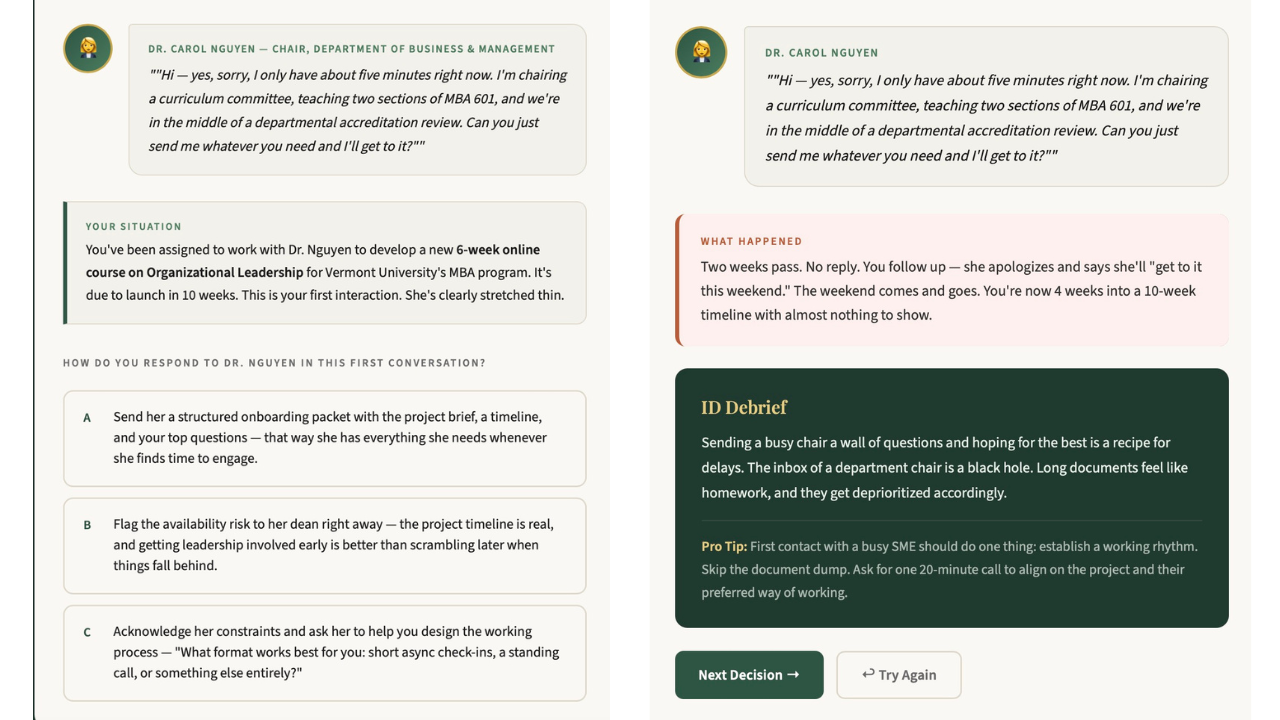
The best part about the simulations is that you can then adapt and change anything. I uploaded my articles about collaborating with SMEs to make the feedback stronger. I didn't like the original colors and fonts so I asked it to look like a more modern university. I also found that the first version was way too easy. Every correct answer was "B," which made everything highly predictable. I asked Claude to randomize the answers, and to make the entire simulation more challenging. After four different iterations, you are seeing the final product.
Since this time, I've made several more simulations with my latest one taking up to 20 minutes to complete. You can take this however far you want to go. You can access the simulation with this link too.
2. Websites
For live events on campus, I'm tasked with putting together resources for our learners. This can include anything from the day's agenda, additional resources, speaker information, optional activities, etc. You can think of it like putting together a mini-conference. As you can imagine, it takes quite a bit of time to not only curate every item, but then to deliver this to learners.
With another live event around the corner, I wanted to see if Claude could take all of the information I gathered and house it into one simple website. I had found several resources to send to students on the latest with AI and leadership like articles, podcasts, and reports. So, I asked Claude to create a site using the MIT colors along with the resources I listed out. I wanted title cards as previews for each resource, along with a filter and sorting system.
And after a few revisions, here's what I had:
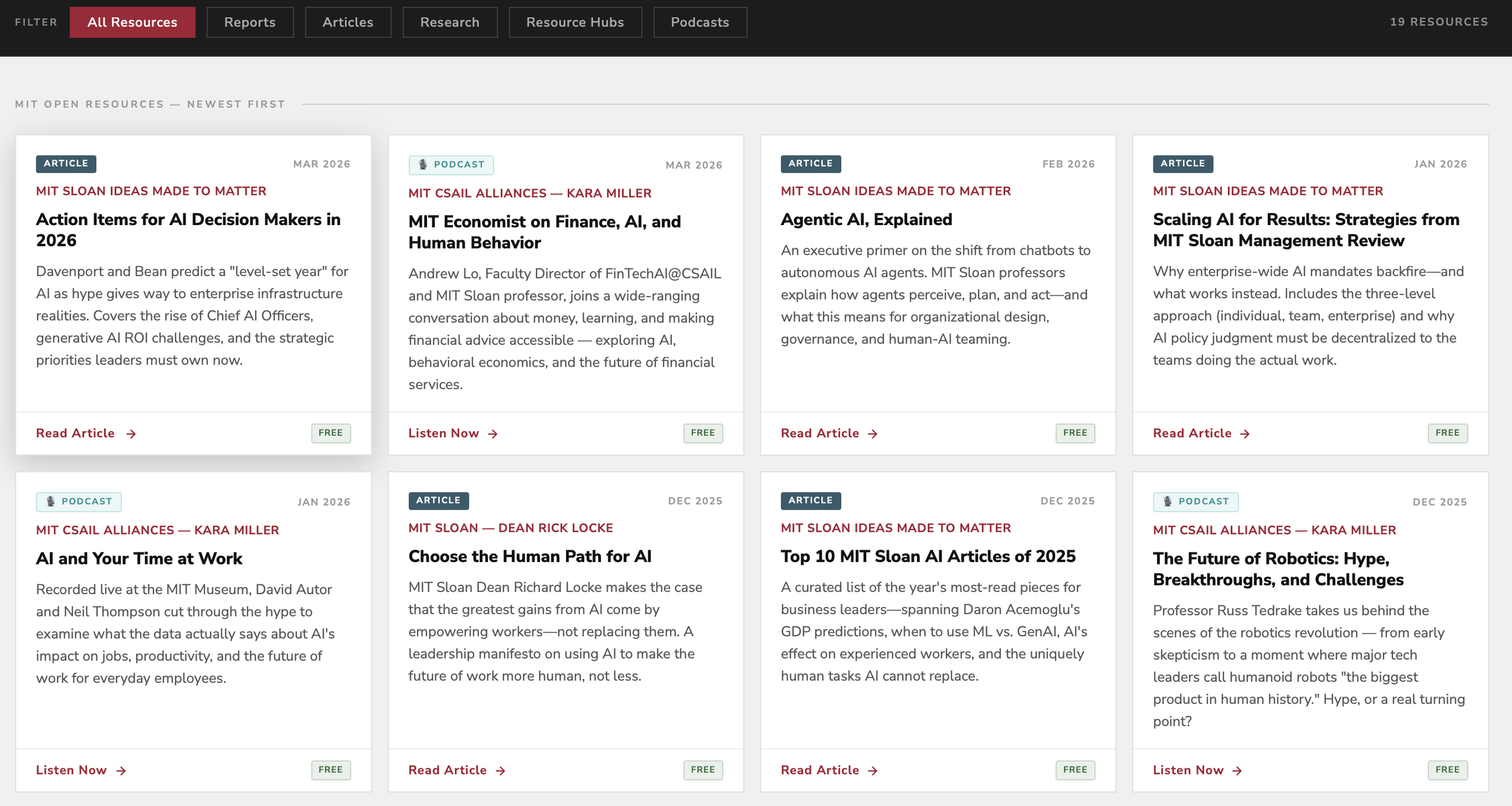
So, let's do a comparison for a second. Either I could have made a course announcement listing out each resource or, I could create a user friendly live website that will constantly update for students. The other item that this eliminates is how much back and forth is involved with contacting the many stakeholders for this program. If I do this right, it will consistently pull the information from each major open publication within MIT, creating a sort of MIT AI+leadership hub.
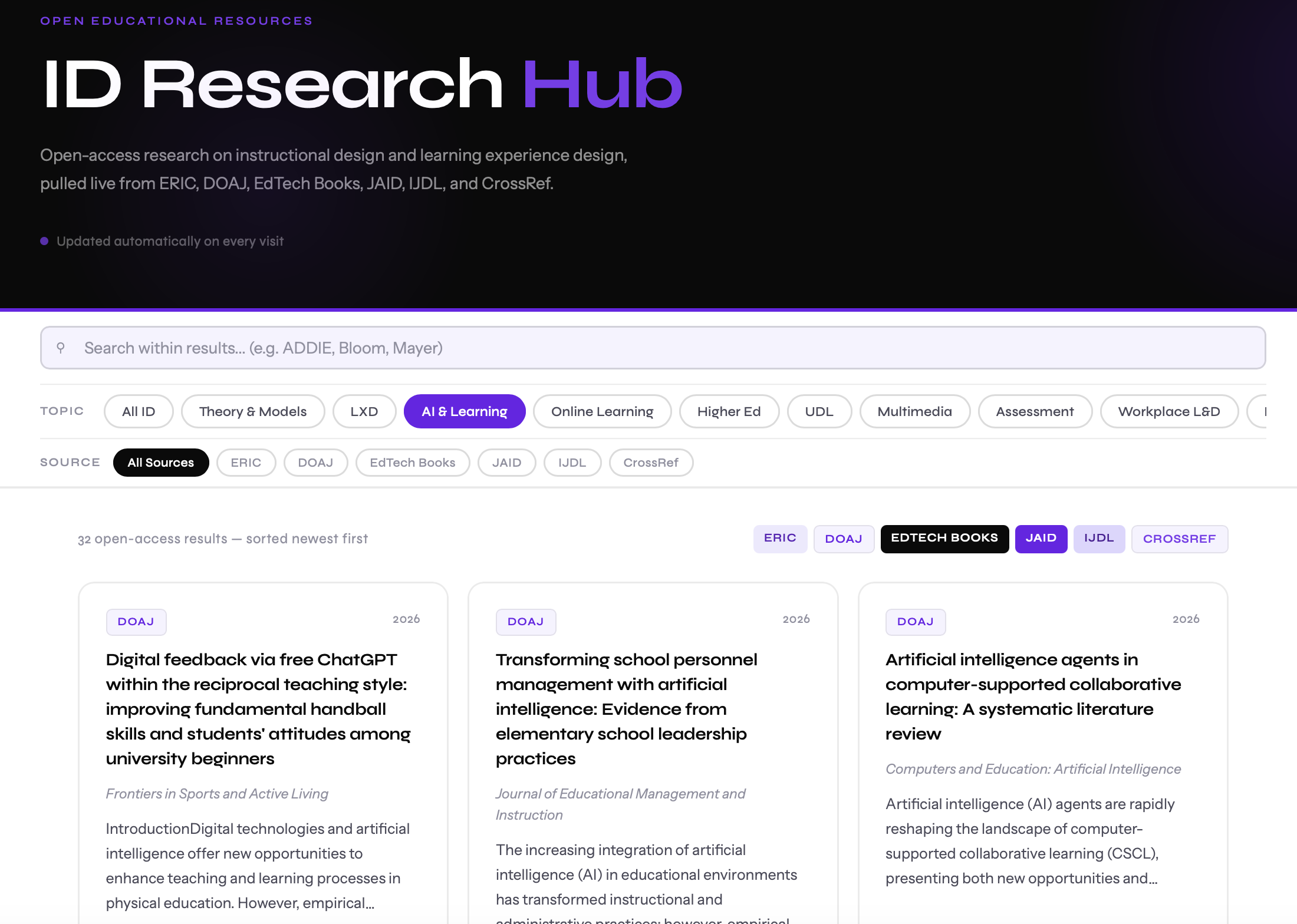
Along the same lines of thinking, I realized I could convert my Learning Science GPT into this kind of automated site. Some of you may remember this GPT that acted like a daily newspaper for learning sciences. It would give you an update on the latest research by pulling this information from a few selected journals. I'm testing out right now what this would like from an ID Research Hub. It pulls from sources like ERIC, DOAJ, JAID, etc. The fields will populate based on what you are looking to learn more about and then bring you to the appropriate source:
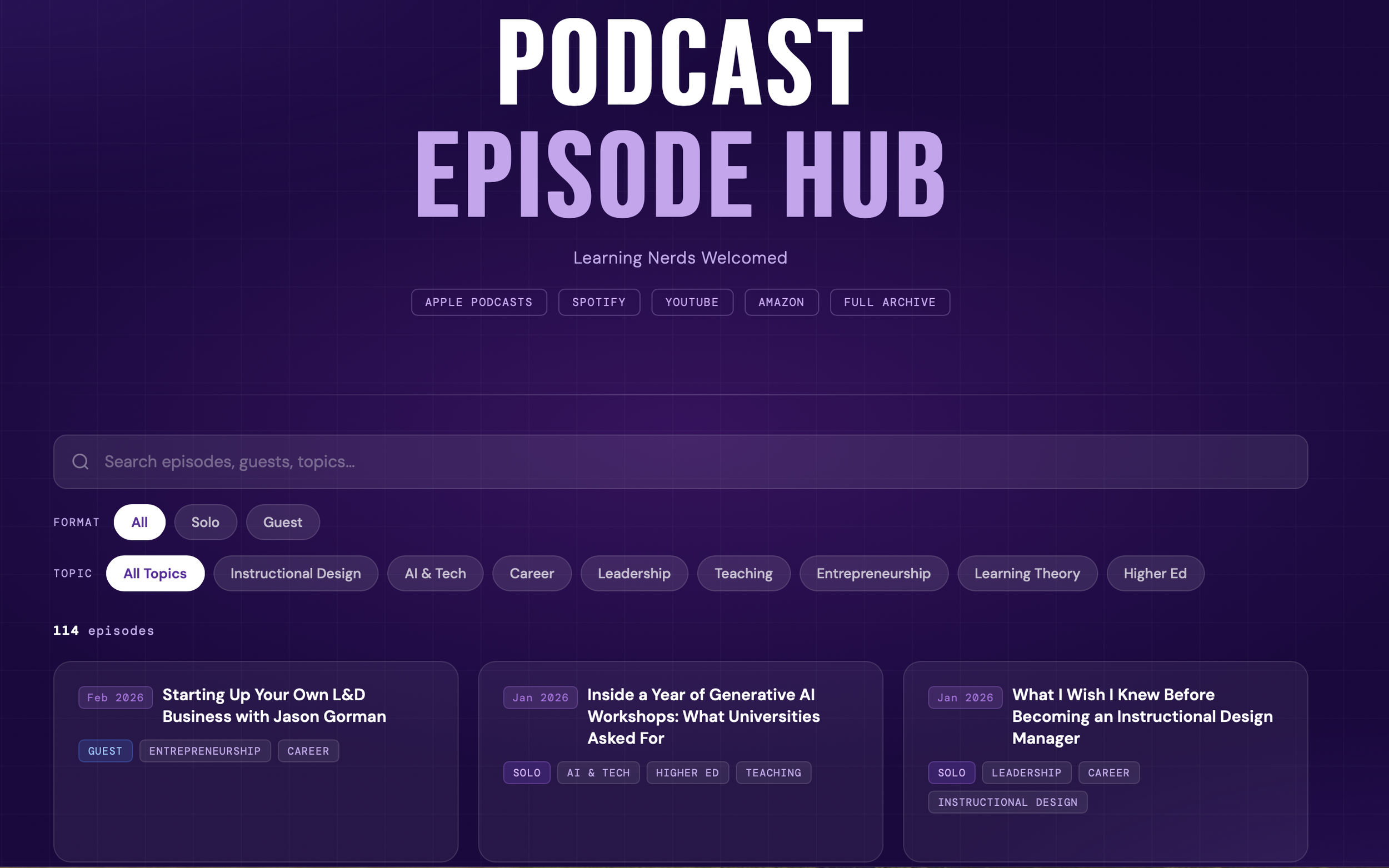
I've even done the same with my own website. After 130 episodes, it's easy for the old episodes to get buried and become unsearchable. I added in filters for the year the episode was released, solo vs guest, and topics (ID, AI, leadership, learning, and teaching):
While none of these are earth-shattering, they are extremely convenient. This kind of approach aligns with trying to put the learners and students at the center of our designs.
3. Prototypes
Seven years ago, my wife, Dad, and I were talking about a problem organizations faced with leaving the right person out of the room. We all experienced this with a team being formed to lead an initiative or solve a problem, and then afterwards, you would find out there was an incredibly valuable member to the team, but you didn't know their background, experiences, education, skills, etc. All of the talent was in the building, but it was a visibility issue on who can contribute to what project. I thought back to taking so many different kinds of assessments on personalities, strengths, emotional intelligence, and then that information was forgotten about.
So, we came up with a very early concept of making like a combination of a baseball card with a fantasy football app to build the best team possible for the job to be done. In a fantasy football app, the idea is for you to see the players' statistics and then to build the best team for your highest chance of success. This was a fun project that phased out over time, but I was curious what Claude would do with this idea.
I found my early docs and a photoshopped file of what the "player profiles" would look like. And then what it created was a true, "Whoa, this is getting crazy," kind of moment:
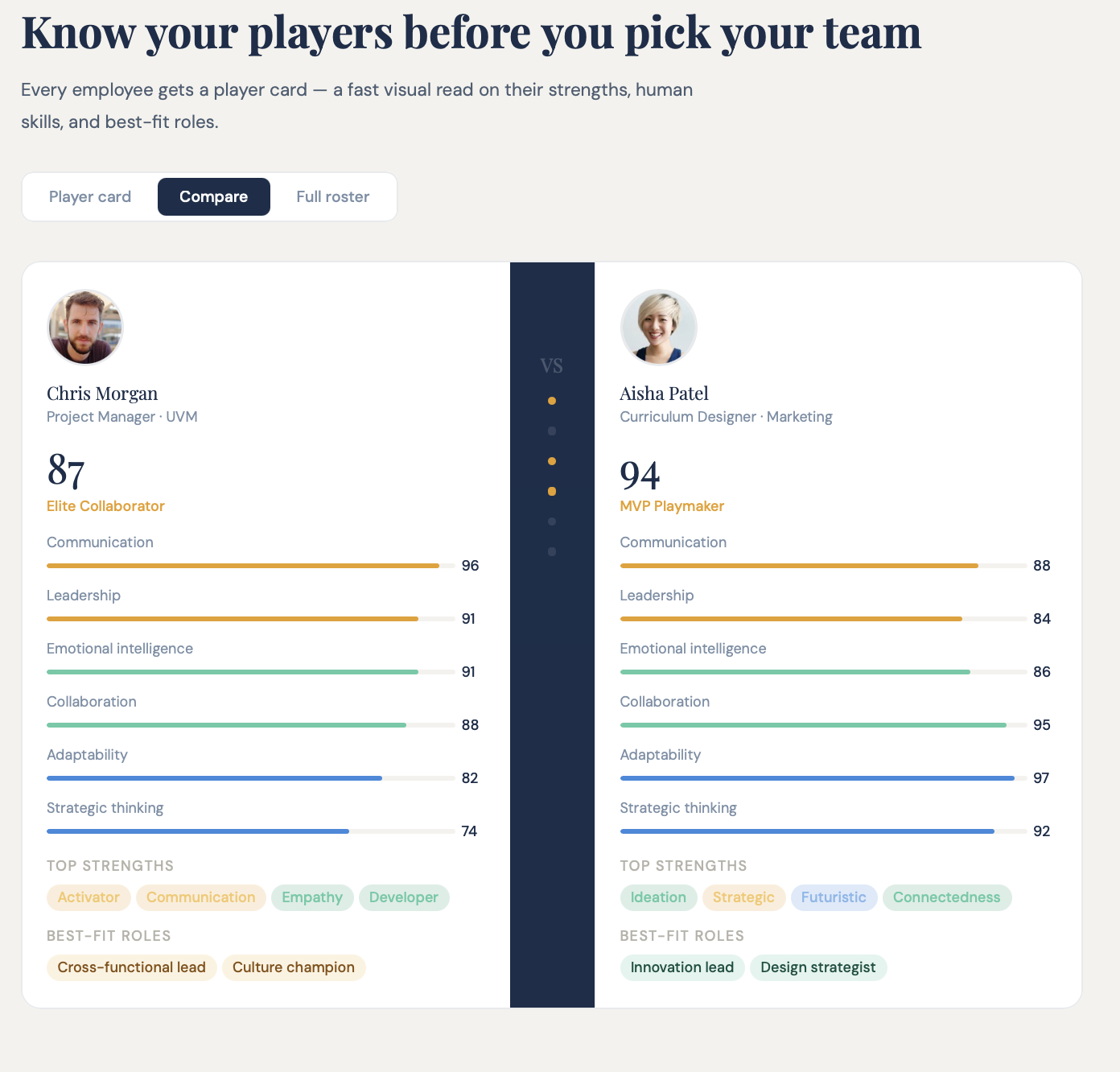
Sure enough, there were the statistics, the building-a-team option, and a comparison feature. On top of all of this, it made the website to accompany the DreamTeam app idea. Oh, and as you can probably guess, there was a prototype app. As someone who knows enough HTML to get by, this is insanity. I now want to go back to all of the old ideas I had that never saw the light of day and see what I can bring to life.
4. Interactive Visuals
This suggestion was the start of my experimentations.
After finishing another lecture for my Ed.D. students, I was reviewing my slides and wishing I could do something more with them. I already knew that Claude could do quite a bit for improving slide decks, but that wasn't necessarily what I had in mind. I always share my slides with students before the lectures, and what if they could go through them and have a better kind of experience?
I was thinking about this specifically for one slide on the timeline of learning and development. In the slide, it's a basic timeline on major milestones of instructional design. It shows the topic and a very brief description below:
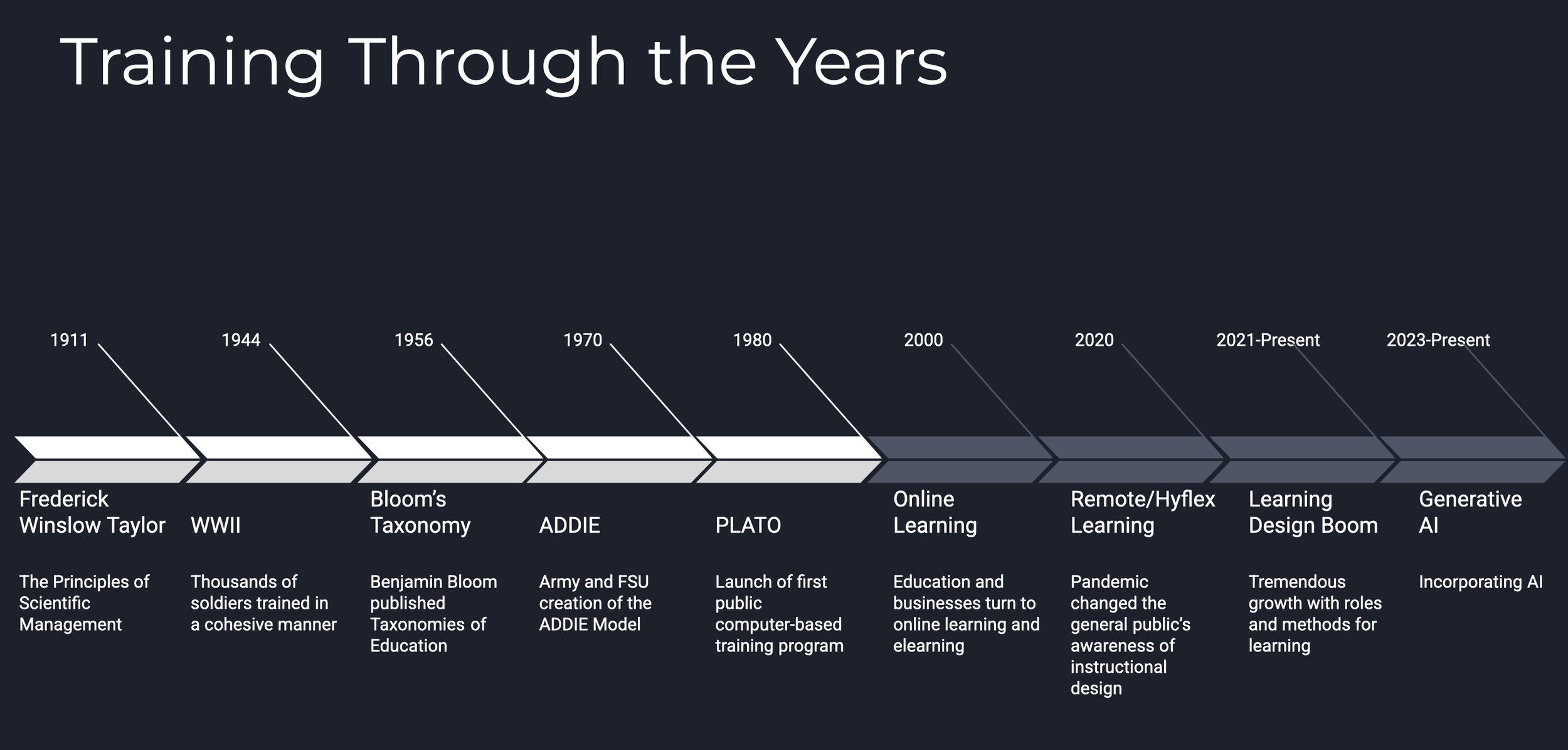
There are of course several limitations with this just being a slide, and not to mention, there is only so much space to capture the history of an entire field. This had me wondering if I could take this and then make it like an interactive timeline. The students could select on each topic and then it would expand with key terms, relevant facts, and maybe even a quote or two from a direct source. So, off I went into Claude and look what it came up with:
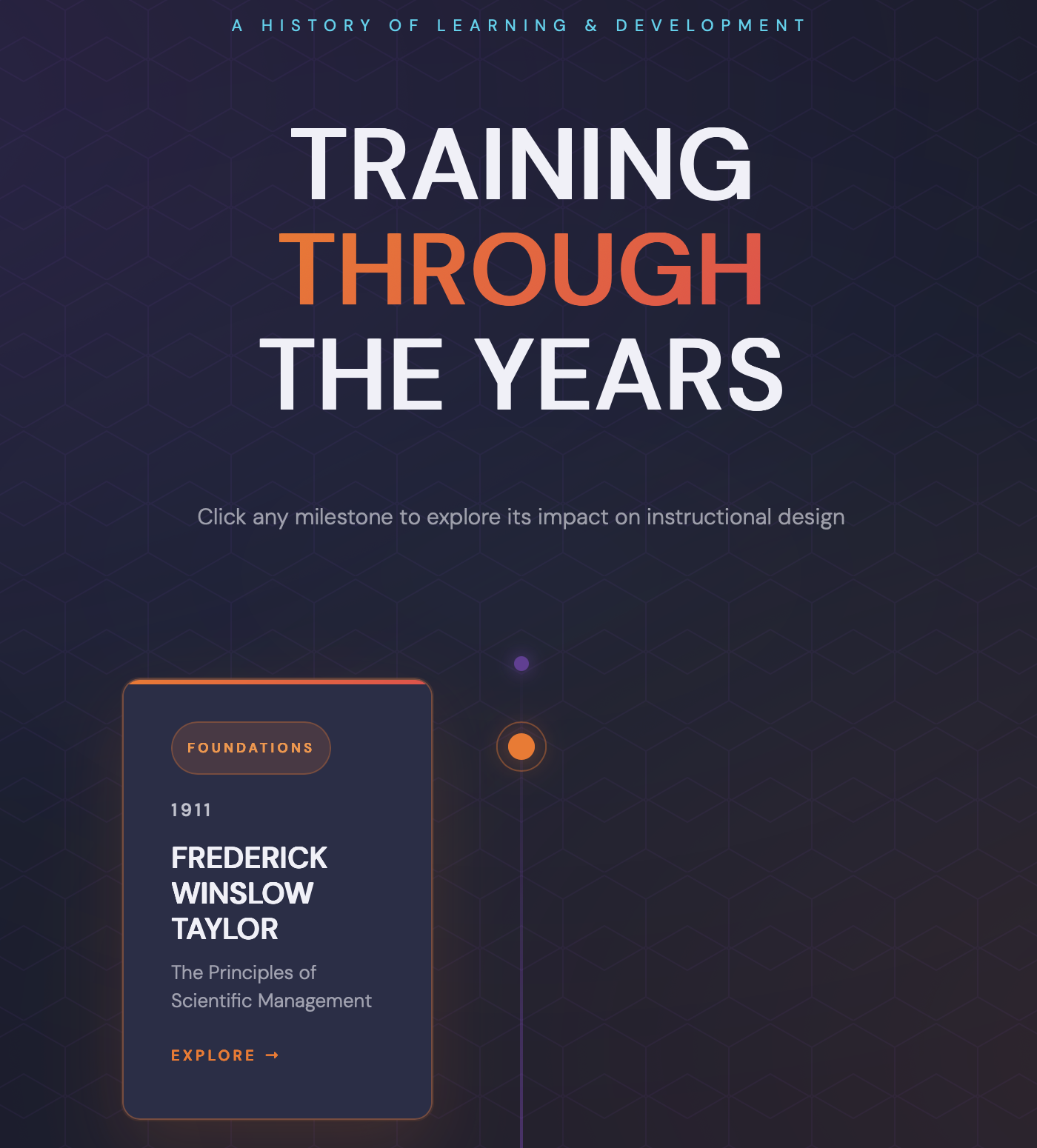
Sure enough, I was able to create an interactive timeline and greatly expand on my original slides. By selecting the points in time, the students could dive on in further to each milestone.
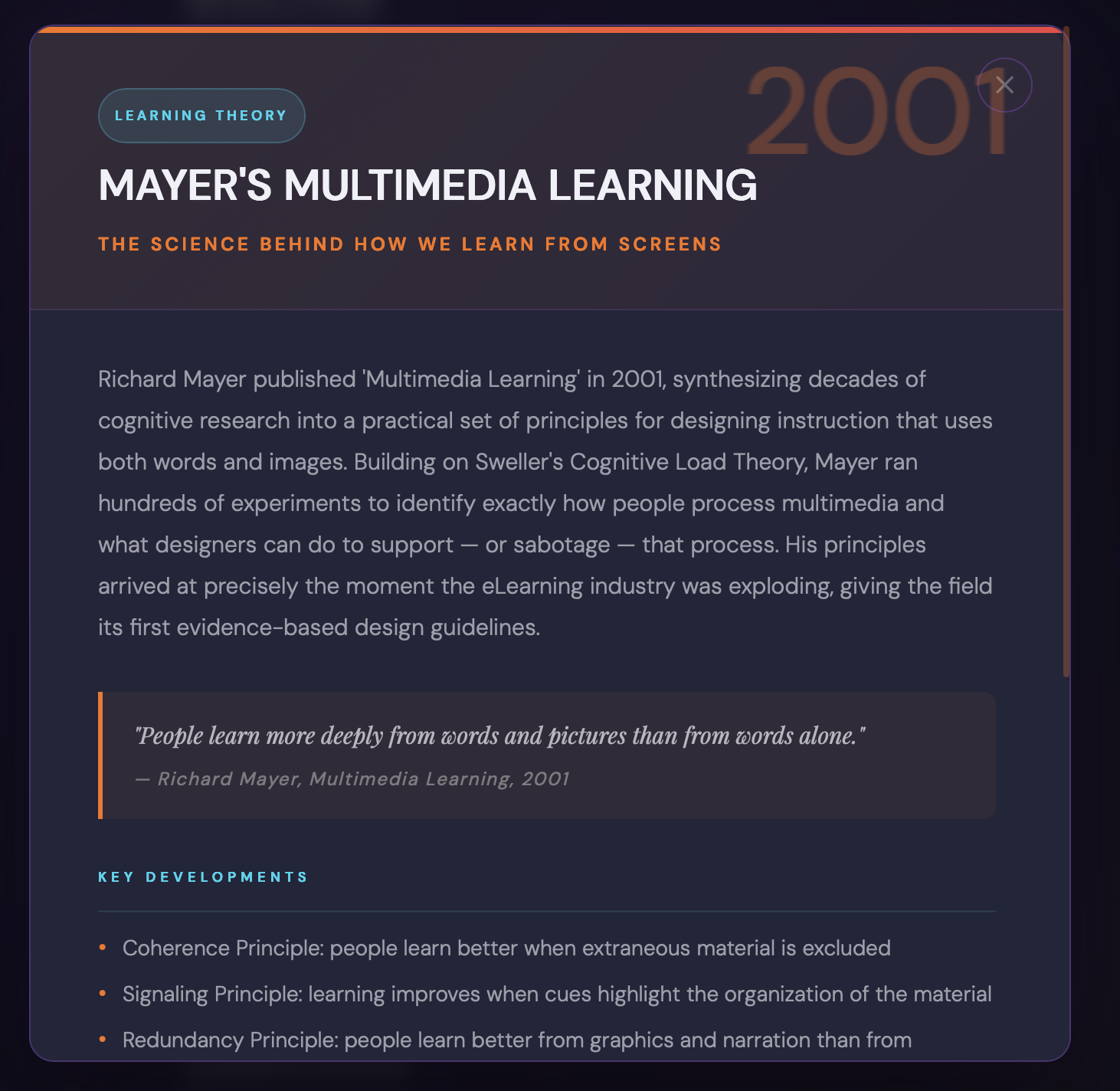
What was a fun exercise was sending this to instructional design friends and asking them what they would change. I heard from a few about how I should add in other researchers or pivot moments in time. And with each suggestion, I would go back to Claude, point to a key source on where to pull the information from, and say what I was hoping for. Sure enough, a working prototype was done and it now lives on my site.
Now, I want to reinforce that wording in that everything you've seen today is a working prototype. They can always be updated or changed. This is one key sentiment I hear from folks that they are disappointed by the first result and want to move on. You need to treat the first output as a failed experiment. It might look amazing, but when you click around, you find that links don't work, or a font isn't readable, or the color combination is terrible.
Claude is going to produce something that's only okay. And for some, I know first impressions are everything, and they feel discouraged when the initial result isn't what they hoped for. It's going to take trial and error to get this right, but the final results are incredible.
A tremendous thank you to our sponsors who support this show! By supporting them, you’re supporting this podcast and newsletter.

Poll Everywhere
Get Your Free Semester of Poll Everywhere 2.0

Brightspace by D2L
Try D2L Brightspace for 30 Days. Get instant access and see for yourself why millions love Brightspace

The Instructional Design, Engagement, and Support (IDEAS) website provides information and resources to help all members of the UMass Amherst community with online teaching and learning technologies.