Creating a Learning Nerd Tool
As an instructional designer, you’re making several decisions in your learning experiences. You might not even realize it because it’s second nature at this point. You meet with your SME, draft up an outline together, and like magic, the puzzle pieces start to fit together. “Oh, after this video we should have them write a journal entry to reflect upon a time when this situation happened to them and what they learned from the experience.” Before you know it, your course map is filling out nicely, and you think you have quite the memorable and effective learning experience.
But how did you know that a journal entry would be best after that video? Why didn’t you choose a scenario-based problem? Why didn’t you have it flow into a discussion board to build upon the conversation and momentum? These have been questions one of my newer instructional designers has been asking me on my team, and they made me pause for a moment.
After being an ID for over a decade, I know what learning strategies make sense to incorporate, when, and where in the design. One strategy is chosen because it’s a lower cognitive lift. One is selected because it perfectly wraps up a series of weeks to make a great summative assessment. One might be selected to drive more engagement because the content is a bit dull and needs a spark. There are several reasons why you will choose one learning strategy over another, but I know that can be tricky for newer designers.
So, in today’s article, I want to share with you a tool I built to help you figure out which one makes sense to select and for which occasion. I’m calling it Learning Strategies That Actually Stick. This tool was built by taking many of the presentations I’ve done over the years and compacting this information into one system. After everything was said and done, this came out to 24 different kinds of learning strategies you can use. I was actually a bit surprised to see that number, but as you know, good learning design is far beyond just essays and quizzes.
So, here’s how this works. There are three different kinds of filtering options: assessments (formative or summative), modalities (individual, group work, or hybrid), and time to implement:
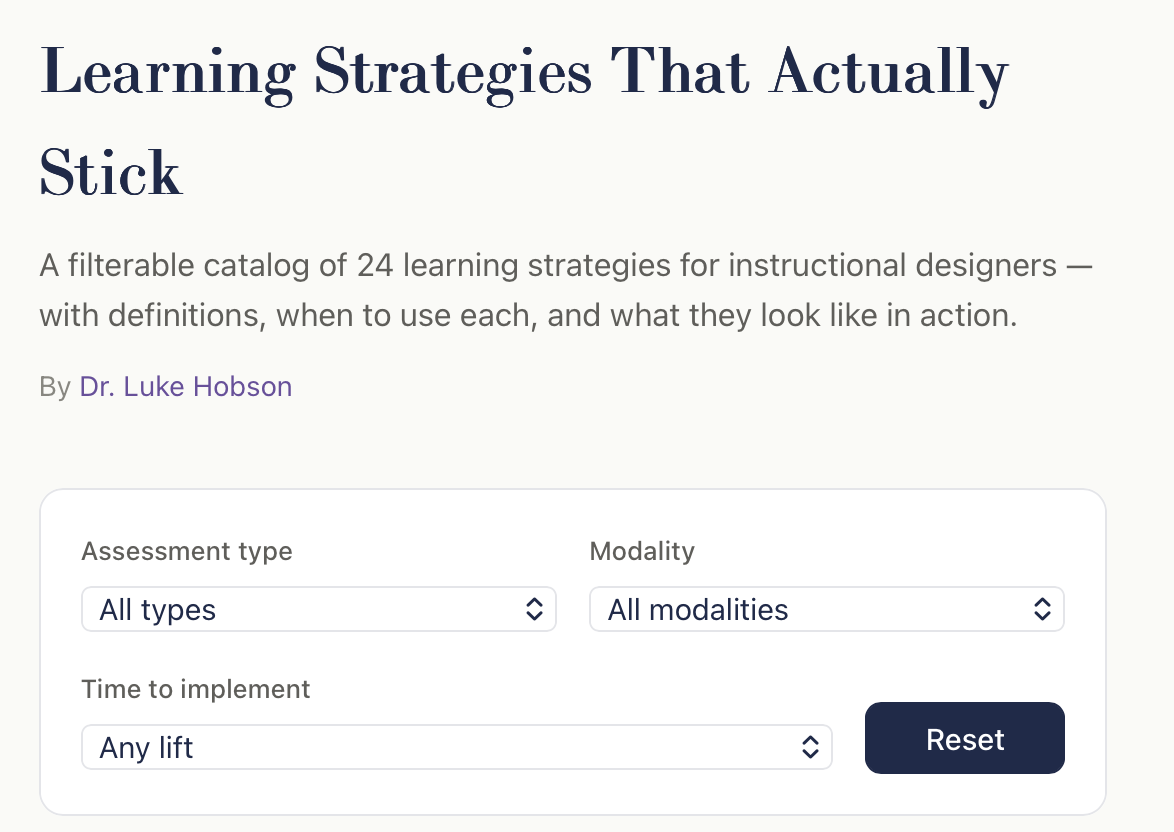
Formative assessments are ongoing, low-stakes checks used during learning to guide instruction and improve student understanding. Think of multiple-choice questions, polls, matching games, practice questions, etc. Summative assessments are high-stakes evaluations conducted after learning to measure proficiency against standards. Think of case studies, project-based learning, capstones, etc. These require much more effort.
While modalities are self-evident as individual or group work, the hybrid filter is in place because you do have some assessments where it might make more sense to do one or the other. Think of presentations. In some cases, you want to measure group work, collaboration, and communication versus seeing if someone can put together a presentation on their own. The last category, though, is the one that’s worth really diving into, and that’s time.
The way it was constructed was around time to implement for you, the designer. This filter ranks the time it takes to craft the strategy as low, medium, or high. Low are simpler tasks, and high are complex. Think of how long it takes for you to create a game or simulation, set up the proper sequence for designing a learning experience in a community setting, or set up connections in an experiential learning capacity.
The coincidentally helpful part about this is that however long it takes you to design an assessment usually means the same amount of time it takes for students to complete it. Setting up a problem-based learning assessment takes a lot of time and effort to design, and it takes students that same amount of mental energy to solve the problem too.
Within each strategy, there will be a definition, when to use it, and an example in action. I’m working on improving these examples right now. One issue I’m running into is that the title card can’t fully display my examples. Some of them are short and to the point, but trying to share every detail with a PBL assignment is naturally longer. While I’m updating this, the key ideas are still in place and can be used right now.
Once you have your course outline, learning objectives, and ideas for the content, these strategies can provide direction for what technique to use and when. I would think about this process with two key thoughts in mind. The first is making sure the technique you select aligns with the overarching goals of the course, training, workshop, program, etc. If I’m creating a short course on how to negotiate a higher salary at your job, a role-playing activity or scenario-based problem would absolutely align with the overarching goals. While others may fit, they aren’t the most optimal. I wouldn’t select an essay or a narrative assignment on how to get the raise you’re looking for.
The second key thought is to think about the time spent in the learning environment. I’m not a stickler for many things in life, but one massive issue I have is when designers overestimate or underestimate time. If a module is going to take 5 to 7 hours to complete, then it better be as close as possible to that range. If someone goes through the module and spends 20 hours, something is terribly wrong and needs to be revised. You should use this learning strategies tool as a guide for how long strategies will take. For instance, peer-reviewed assignments are an excellent teaching tool. Students complete their own assignment and then review the work of other students by leaving feedback. It’s a great way not only to see multiple perspectives, but also to learn how to provide proper feedback. This takes time to do. It’s not a one-hour assignment in the course and should have enough time built into the module to complete.
Overall, use this as a step in the right direction for your designs. These can be for in-person or online learning experiences. I’m going to add more to make them better, but it’s still a valuable tool for right now.
Hey folks! Question for you. What are you doing on July 8th?
If the answer is nothing, you should come join us at Fusion. This is the learning conference hosted by D2L and this year, it’s going to take place in Phoenix, Arizona. Robyn Hammontree and I are going to be hosting a pre-conference workshop on how to redesign your courses and programs in the age of AI. This will be a full-day workshop, which means you will know everything I do by the end of the session. So, come nerd out with us! You can sign up by using this link and be sure to use the discount code ROBYNLUKE150 to save $150 off your enrollment.
A tremendous thank you to our sponsors who support this show! By supporting them, you’re supporting this podcast and newsletter.
Brightspace by D2L
Try D2L Brightspace for 30 Days. Get instant access and see for yourself why millions love Brightspace

Poll Everywhere
Get Your Free Semester of Poll Everywhere 2.0

The Instructional Design, Engagement, and Support (IDEAS) website provides information and resources to help all members of the UMass Amherst community with online teaching and learning technologies.